El34 world logo

image
Bike Light Parts Capacitors Tubes-Valves Capacitors
Wire-Cable-Heat shrink Pots-Knobs Switches Guitar Strings
Chassis-Boxes Jacks-Plugs-Connectors Bike Light Parts Pots-Knobs
Jacks-Plugs-Connectors Misc Hardware-Grommets-Feet-Ring terminals Resistors Tubes-Valves
Screws-Nuts-Washers Pots-Knobs Tubes-Valves Tubes-Valves
Screws-Nuts-Washers Pots-Knobs Pots-Knobs Tubes-Valves
Tools and Batteries Jacks-Plugs-Connectors Fuse Holders-Cords-AC Items Jacks-Plugs-Connectors
Handles-Amp Trim Parts Switches Jacks-Plugs-Connectors Lamps-Diodes-Channel Switching
Switches Transformers Lamps-Diodes-Channel Switching Tube Sockets
Circuit Board Building parts Capacitors Switches Tools and Batteries
Transformers Tube Sockets Misc Hardware-Grommets-Feet-Ring terminals Tube Sockets
Lamps-Diodes-Channel Switching Tools and Batteries Jacks-Plugs-Connectors Jacks-Plugs-Connectors
Screws-Nuts-Washers Wire-Cable-Heat shrink Fuse Holders-Cords-AC Items Tube Sockets
Switches Pots-Knobs Tube Sockets Pots-Knobs
Pots-Knobs Wire-Cable-Heat shrink Foot Pedals Lamps-Diodes-Channel Switching
Screws-Nuts-Washers Tools and Batteries Circuit Board Building parts Transformers
Wire-Cable-Heat shrink Lamps-Diodes-Channel Switching Chassis-Boxes Books
Pots-Knobs Jacks-Plugs-Connectors Jacks-Plugs-Connectors Pots-Knobs
Tools and Batteries Circuit Board Building parts Foot Pedals Handles-Amp Trim Parts
Misc Hardware-Grommets-Feet-Ring terminals Foot Pedals Transformers Fuse Holders-Cords-AC Items
Fuse Holders-Cords-AC Items Fuse Holders-Cords-AC Items Resistors Tube Sockets
Jacks-Plugs-Connectors Lamps-Diodes-Channel Switching Tube Sockets Reverb tanks and Bags
Tube Sockets Jacks-Plugs-Connectors Resistors Lamps-Diodes-Channel Switching
Pots-Knobs Pots-Knobs Resistors Capacitors
Tubes-Valves Fuse Holders-Cords-AC Items Misc Hardware-Grommets-Feet-Ring terminals Circuit Board Building parts
Lamps-Diodes-Channel Switching Handles-Amp Trim Parts Transformers Tube Sockets
Jacks-Plugs-Connectors Capacitors Handles-Amp Trim Parts Screws-Nuts-Washers
Switches Handles-Amp Trim Parts Circuit Board Building parts Wire-Cable-Heat shrink
Transformers
You can scroll through the images above using the Image scroll controls or you can use the Left and Right arrow keys on your keyboard.


Guitar Rig 2 - FCB1010 Midi pedal Setup

Back to the main Sound page

-
This page assumes that you already have set up your FCB1010 Midi foot controller and are now ready to assign functions in GR2.
If you have not set up your FCB1010 controller yet, follow this link to program your FCB1010 controller first.
Note that I have the UNO PROM chip upgrade in my FCB1010 which lets me do Stomp Box mode.
You cannot do Stomp box mode without the UNO chip
-
image
  After you have set up your FCB1010 midi foot controller, you can use it to turn on and off things in GR2. You can use the FCB1010 expression pedals to turn knobs and move sliders like a Wah Wah or Volume slider. You can also sweep through all kinds of other things like EQ settings.
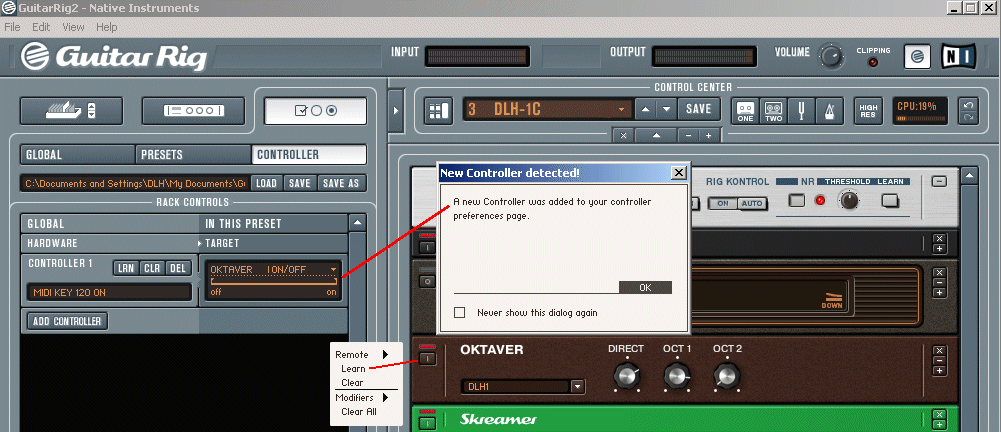
Here's how I turn on and off my Octavia using pedal #6/Stomp Box #1 on the FCB10101.
* Right click your mouse on the Octaver on/off button.
* A small dialog box opens up.
* Choose, Learn
* Now press footswitch pedal #6/Stomp Box #1 on the FCB1010.
* A bigger dialog box opens up saying that a new controller has been detected.
* GR2 adds the new controller to the list of controllers on the left side of the screen.

In this case, the new controller found is Controller #1, Midi key 120 ON.
You can see on the right side of the controller target area that it now controls Oktaver ON/OFF.

You can set up a Wah Wah pedal or volume pedal using the FCB1010 Expression pedals in the same exact way as described above.
* Right click your mouse on the Wah Wah pedal slider.
* A small dialog box opens up.
* Choose, Learn
* Now press one of the expression pedals on the FCB1010.
* A bigger dialog box opens up saying that a new controller has been detected.
* GR2 adds the new controller to the list of controllers on the left side of the screen.

Notes:
You can add lots of controllers in GR2. The FCB1010 has a ton of pedals and two expression pedals that can all be used as controllers.
If you assign the same controller to another GR2 function in the same preset, the first function will be erased and the controller will now control the new function.
Each preset in GR2 can use any of the controllers you have already added.
One preset can use expression pedal A as a wah wah pedal and another preset can use the same expression pedal as a volume pedal.
Remember to save your presets after you make changes. If you add controller functions and then change to another preset, your changes will be lost unless you save the preset first.
You can delete controllers from the stack by clicking the DEL button. I have not figured out how to delete a controller in the middle of the stack. It looks like you have to delete from the bottom of the stack up.
You can clear the controller assignment by clicking the CLR button.
You can re-learn your controllers by clicking the LRN button.
You can set parameters for the controller on the right side target area by moving the sliders. See the off----on sliders under OKTAVER ON/OFF in the image above.
You can also set up components by left clicking on top of the right side controller target area. All the components in the current preset show up in a window.
 

-


image

image

Home - Ordering Information - PayPal info - Returning parts - Search the Hoffman Amps parts catalog - Links
Shipping Info/policy - E-mail Me - Amplifier Service Technicians - About Hoffman Amps
Sound Clips - LED Bike light build info - Guitar Rig and Behringer FCB1010 info
The Tube amp Library of information - Charts - Diagrams - How To's - Projects
Click the link above for Tube amp info, Schematics, Board building information, Projects, Mods, Transformer diagrams, Photo's, Sound clips.
There are hundreds of pages of Tube amp information on my library page.
Check out our huge library of Tube Amp Schematics here

Please visit my Tube Amplifier Forum
Here's the place you can go to ask tube amplifier questions.
You will find a large community of friendly amp builders at the link above.

@ MEMBER OF PROJECT HONEY POT
Spam Harvester Protection Network
provided by Unspam
hand-mild