
Setting up Guitar Rig 1 for a SoundBlaster Audigy 2 ZS sound card.Back to the main Sound page |
| - |
| When I downloaded the Guitar Rig 1 (GR) demo program, I had a SoundBlaster (SB) live 5.1 card. Creative does not supply ASIO
drivers with this card and so I found a driver called ASIO4ALL. I was able to get GR up an running on the live 5.1 card and
test the GR demo program using ASIO4ALL. The latency was around 13ms with ASIO4ALL but it worked fine just to demo the program. After testing GR, I decided to purchase it. I also bought a new SB Audigy 2 ZS sound card because I got a great deal on it and it comes with Creative 2.0 ASIO drivers. The Audigy card sounds much better to me than the SB live 5.1 card and the latency is down to 2ms with the Audigy card. Below are the Rig Kontrol 1 and SB Audigy 2 ZS soundcard setups I used at one time. I now use a tube preamp and a Behringer FCB1010 foot controller instead of the Rig Control. It can be very confusing setting up GR for the first time, I hope this info helps. |
| - |
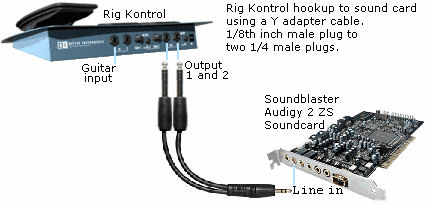 |
| Here is one way to hook up Rig Kontrol to a Audigy 2 ZS sound card. Use a Stereo 1/8th inch male to two mono 1/4 male Y adapter cord. The stereo 1/8th inch plug goes into the Line in on the sound card. The two mono 1/4 inch male plugs go into 1 and 2 out on Rig Kontrol. If you have some other pre amp, the pre amp would supply the guitar signal to the sound card. I use a hand made tube pre amp. The signal from the tube pre amp goes right into the soundcard line in jack. |
| - |
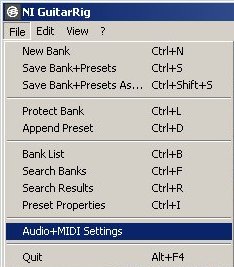 |
| In GR, go to File then Audio+MIDI settings to make your audio setups. |
| - |
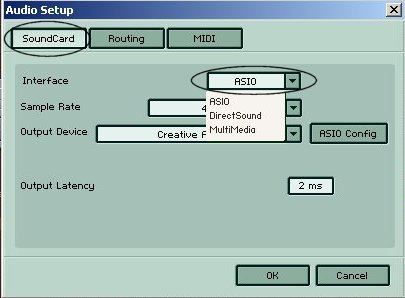 |
| The first tab is Soundcard. The Interface drop down menu is set to ASIO. |
| - |
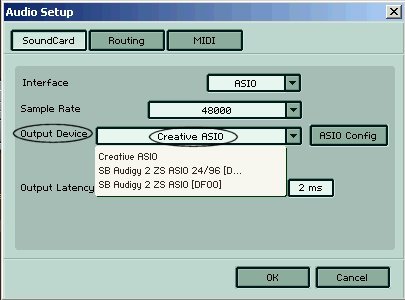 |
| For Output Device I have Creative ASIO selected. |
| - |
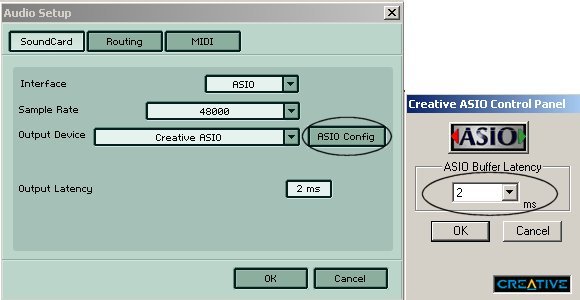 |
| Click on the ASIO Config button and the small window to right opens up. On the drop down menu, select the lowest latency that is available. In the example above, I have 2ms latency using the creative Audigy ASIO driver. On my old SB live 5.1 card and using ASIO4ALL, I was only able to get down to 13ms latency. |
| - |
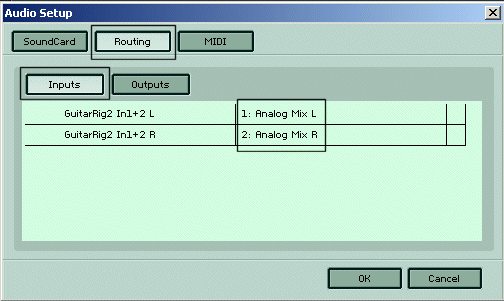 |
| Click on the Routing tab and then click on the Inputs button. I have selected Analog Mix left and right for my
inputs.
If you are using the GR Rig Kontrol foot controller, it has a control signal on one channel and the actual guitar signal on the other channel. Both signals come from the Rig Kontrol pedal and go into the Line In jack on the SB soundcard. GR rig is then able to detect which channel has the guitar signal and which one has the control signal. The two channels are the left and right stereo channels on your line in jack. |
| - |
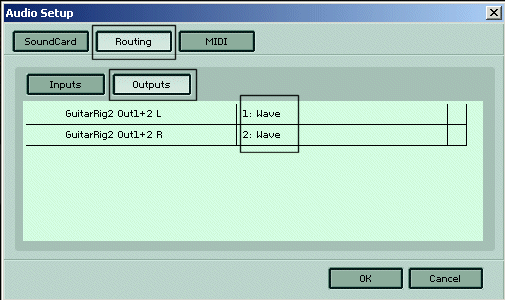 |
| Now click on the Outputs button. I have selected Wave as output 1 and 2. Click on the MIDI tab at the top. Set MIDI to off if you do not need to use Midi |
| - |
 |
| Guitar Rig 1 and Rig Kontrol 1 info |
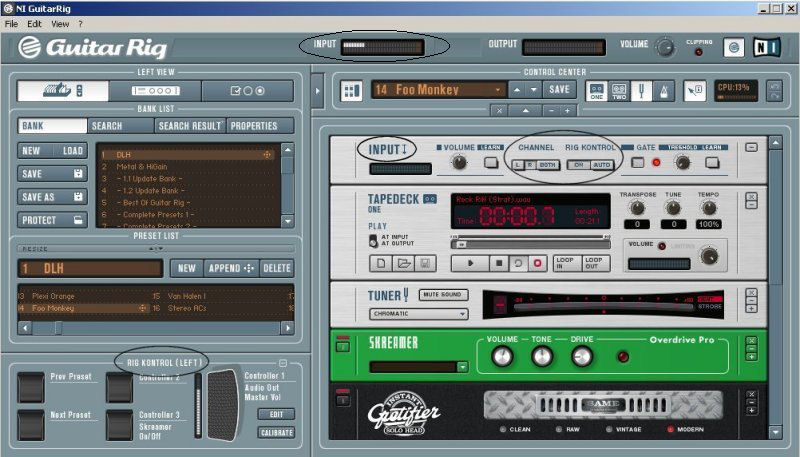
| Here you can see GR is running, Rig Kontrol is running and GR has detected Rig Kontrol. The Rig Kontrol ON button is pressed
in the upper right Input section. In the lower left Rig Kontrol section you can see it says RIG KONTROL (LEFT). That means that the Rig Kontrol control signal was detected
on the left channel of my line in jack. The guitar signal is on the right channel. The input level at the very top of the screen is how strong the incoming guitar signal is. You do not want to clip your signal and create digital distortion. The input level is controlled by two things. The level coming out of your pre-amp is one way to set the input level and the input level of your Windows mixer is the other. On my computer I am running a Audigy ZS Platinum sound card. The line in slider on my creative mixer controls the input level being fed to Guitar rig. Adjust your incoming signal so that on very hard hits, your signal does not go into the red. |